对于这第13个周二提示词,我们挑战AI创建一个完整的微型工具,用于生成您自己的专业名片。
在Linkeum,我们探讨金融、投资和专业活动。在这些领域,人际网络至关重要。还有什么比名片或会议徽章更不可或缺的呢?
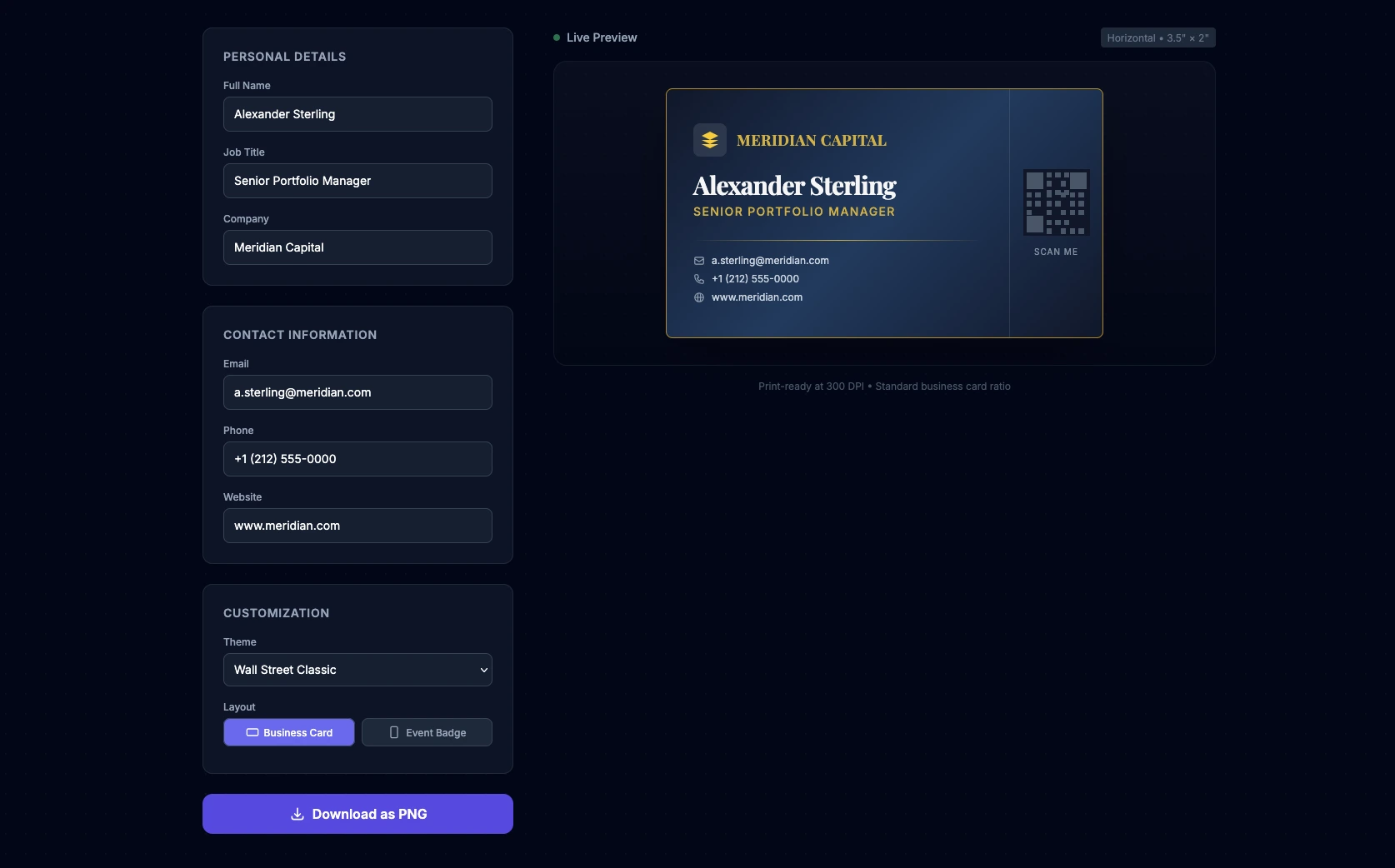
对于这第13个周二提示词,我们挑战AI创建一个完整的微型工具,用于生成您自己的专业名片。目标是生成一个“单页”网络应用程序(将HTML、CSS和JS合并在一个文件中),允许实时自定义名片或徽章。我们要求AI集成专业主题(华尔街、金融科技)、优雅的3D悬停效果,以及将结果导出为PNG图像的功能。
提示词
该提示词是用英语编写的,以最大化生成代码的质量,特别关注UI/UX设计以及通过CDN使用外部库。
Act as an Expert Frontend Developer and UI/UX Designer specializing in Fintech and Corporate enterprise platforms. Your mission is to create a single-file web application (HTML, CSS, and JS combined) that functions as a real-time, premium Business Card and Conference Badge generator.
Design & Layout Strategy:
- The UI must be highly professional, elegant, and trustworthy. Think "Investment Banking meets Modern Tech Startup".
- Use Tailwind CSS (via CDN) for rapid, clean styling.
- The layout should be split: a sleek configuration panel on the left (or top on mobile), and a sticky real-time live preview of the card on the right.
- Background: A subtle, sophisticated dark mode (slate/gray) or a clean corporate light mode.
The Live Preview Card (The core element):
- The card itself should look like a physical premium business card (standard ratio 3.5 x 2 inches, scaled up for the screen).
- Add a subtle CSS 3D tilt/glare effect when the user hovers over the card with their mouse to make it feel premium.
- It must include placeholders for: Company Logo, Full Name, Job Title (e.g., "Senior Portfolio Manager", "CTO"), Email, Phone Number, and a QR Code placeholder.
User Inputs & Configuration (HTML/JS):
- Text Fields: Name, Job Title, Company, Phone, Email, Website.
- Theme Selector (Dropdown):
- "Wall Street Classic" (Navy blue & Gold)
- "Fintech Minimalist" (Pure black, white text, subtle neon accent)
- "Tech Conference" (Vibrant gradient background with glassmorphism).
- Layout Toggle: Choose between "Business Card" (horizontal) or "Event Badge" (vertical).
Logic & Export (JavaScript):
- JS must instantly update the card's DOM elements as the user types (real-time data binding).
- Include a "Download Card" button. Use the
html2canvaslibrary (import it via CDN) to capture the card's HTML node and trigger a PNG download so the user can actually save their creation.The final code must be clean, heavily commented, fully functional in a modern browser, and require zero local installation.
我们测试后的评价
我们在Qwen上测试了这个提示词,作为“一次性生成”,结果令人惊叹。界面瞬间生成,3D效果带来了真正的高级感,主题应用得也非常完美。
作为开发人员,您会注意到需要进行一些手动的微小调整才能达到完美:二维码需要一个真正的库才能发挥作用,通过html2canvas进行PNG截图有时会使复杂的CSS元素略微偏移。然而,作为10秒钟生成的基准,这节省了极其宝贵的时间!
轮到您了!
复制代码,调整细节,为您下一次的社交活动制作完美的徽章!如果您喜欢这类开发技巧和提示词工程以节省时间,请不要忘记订阅我们的时事通讯,以便直接在您的收件箱中接收即将推出的工具和分析。
关键要点
目前还没有评论。快来抢沙发吧!

登录 以参与讨论。