Per questo 13° prompt del martedì, abbiamo sfidato l'IA a creare un mini-strumento completo per generare i tuoi biglietti da visita professionali.
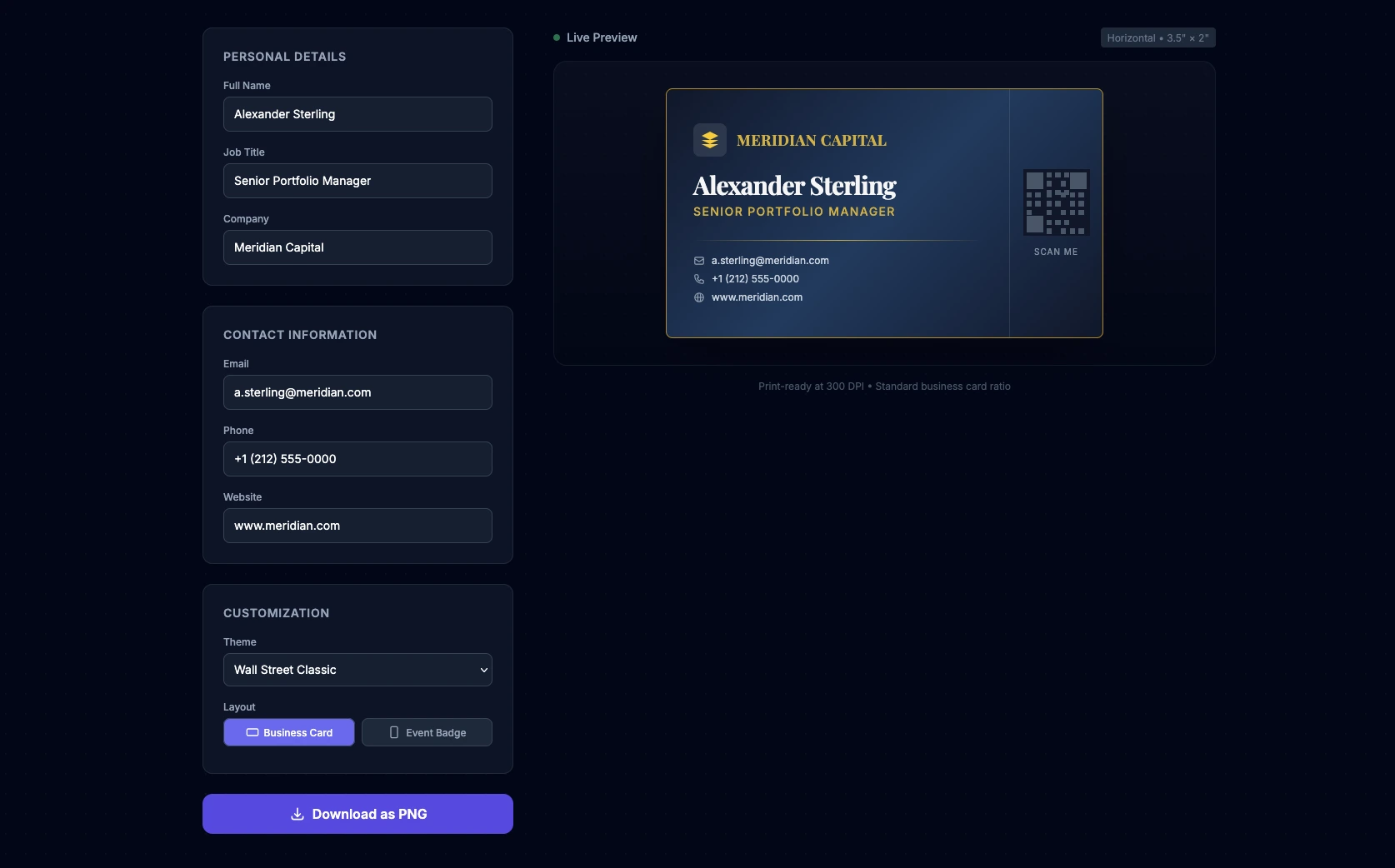
Su Linkeum parliamo di finanza, investimenti ed eventi professionali. E in questi mondi, il networking è tutto. Cosa c'è di più essenziale di un biglietto da visita o di un badge per conferenze?
Per questo 13° prompt del martedì, abbiamo sfidato l'IA a creare un mini-strumento completo per generare i tuoi biglietti da visita professionali. L'obiettivo è generare un'applicazione web "Single-Page" (HTML, CSS e JS in un unico file) che consenta la personalizzazione in tempo reale di un biglietto da visita o di un badge. Abbiamo chiesto all'IA di integrare temi professionali (Wall Street, Fintech), un elegante effetto hover 3D e la possibilità di esportare il risultato come immagine PNG.
Il prompt
Il prompt è stato scritto in inglese per massimizzare la qualità del codice generato, con particolare attenzione al design UI/UX e all'utilizzo di librerie esterne tramite CDN.
Act as an Expert Frontend Developer and UI/UX Designer specializing in Fintech and Corporate enterprise platforms. Your mission is to create a single-file web application (HTML, CSS, and JS combined) that functions as a real-time, premium Business Card and Conference Badge generator.
Design & Layout Strategy:
- The UI must be highly professional, elegant, and trustworthy. Think "Investment Banking meets Modern Tech Startup".
- Use Tailwind CSS (via CDN) for rapid, clean styling.
- The layout should be split: a sleek configuration panel on the left (or top on mobile), and a sticky real-time live preview of the card on the right.
- Background: A subtle, sophisticated dark mode (slate/gray) or a clean corporate light mode.
The Live Preview Card (The core element):
- The card itself should look like a physical premium business card (standard ratio 3.5 x 2 inches, scaled up for the screen).
- Add a subtle CSS 3D tilt/glare effect when the user hovers over the card with their mouse to make it feel premium.
- It must include placeholders for: Company Logo, Full Name, Job Title (e.g., "Senior Portfolio Manager", "CTO"), Email, Phone Number, and a QR Code placeholder.
User Inputs & Configuration (HTML/JS):
- Text Fields: Name, Job Title, Company, Phone, Email, Website.
- Theme Selector (Dropdown):
- "Wall Street Classic" (Navy blue & Gold)
- "Fintech Minimalist" (Pure black, white text, subtle neon accent)
- "Tech Conference" (Vibrant gradient background with glassmorphism).
- Layout Toggle: Choose between "Business Card" (horizontal) or "Event Badge" (vertical).
Logic & Export (JavaScript):
- JS must instantly update the card's DOM elements as the user types (real-time data binding).
- Include a "Download Card" button. Use the
html2canvaslibrary (import it via CDN) to capture the card's HTML node and trigger a PNG download so the user can actually save their creation.The final code must be clean, heavily commented, fully functional in a modern browser, and require zero local installation.
Il nostro verdetto dopo il test
Abbiamo testato questo prompt su Qwen e il risultato è sorprendente per un "One-Shot". L'interfaccia viene generata all'istante, l'effetto 3D aggiunge un vero tocco premium e i temi si applicano perfettamente.
Come sviluppatore, noterai che sono necessari alcuni piccoli aggiustamenti manuali per raggiungere la perfezione: il codice QR richiede una vera libreria per essere funzionale e l'acquisizione PNG tramite html2canvas a volte può spostare leggermente elementi CSS complessi. Tuttavia, come base generata in 10 secondi, è un risparmio di tempo eccezionale!
Tocca a te!
Copia il codice, modifica i dettagli e crea il badge perfetto per il tuo prossimo evento di networking! Se ti piacciono questi trucchi di sviluppo e di prompt engineering per risparmiare tempo, non dimenticare di iscriverti alla nostra newsletter per ricevere i prossimi strumenti e analisi direttamente nella tua casella di posta.
Punti chiave
Nessun commento per ora. Sii il primo a reagire!

Accedi per partecipare alla discussione.