13번째 화요일 프롬프트를 위해 저희는 AI에게 나만의 전문 명함을 생성하는 완벽한 미니 도구를 만들도록 도전했습니다.
Linkeum에서는 금융, 투자, 전문 이벤트에 대해 이야기합니다. 이러한 세계에서 네트워킹은 가장 중요합니다. 명함이나 컨퍼런스 배지보다 더 필수적인 것이 있을까요?
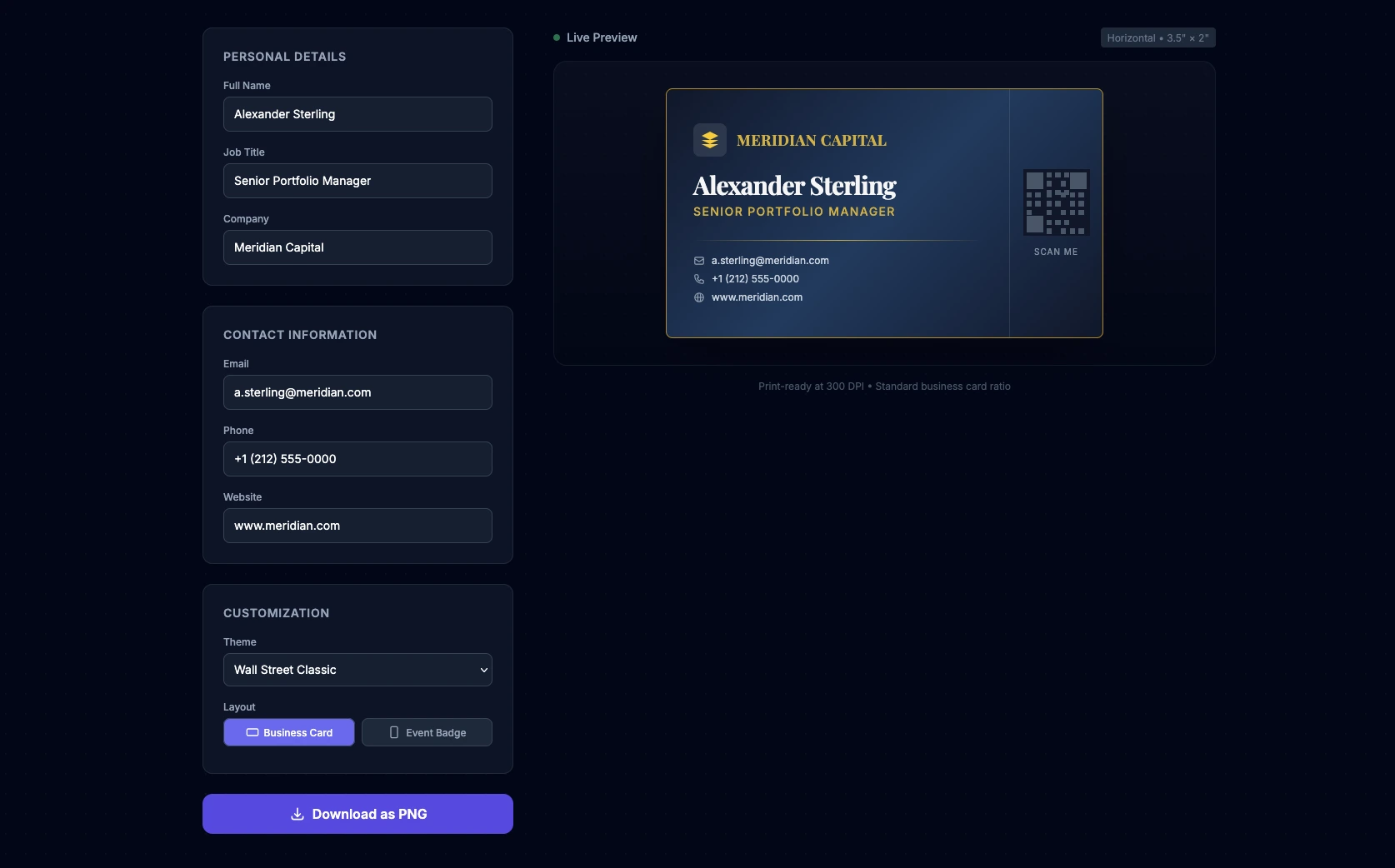
13번째 화요일 프롬프트를 위해 저희는 AI에게 나만의 전문 명함을 생성하는 완벽한 미니 도구를 만들도록 도전했습니다. 목표는 명함이나 배지를 실시간으로 사용자 정의할 수 있는 "단일 페이지" 웹 애플리케이션(HTML, CSS, JS를 하나의 파일에 통합)을 생성하는 것입니다. 전문적인 테마(월스트리트, 핀테크), 우아한 3D 호버 효과, 결과를 PNG 이미지로 내보내는 기능을 AI에 통합하도록 요청했습니다.
프롬프트
생성된 코드의 품질을 극대화하기 위해 프롬프트는 영어로 작성되었으며, UI/UX 디자인과 CDN을 통한 외부 라이브러리 사용에 특별히 중점을 두었습니다.
Act as an Expert Frontend Developer and UI/UX Designer specializing in Fintech and Corporate enterprise platforms. Your mission is to create a single-file web application (HTML, CSS, and JS combined) that functions as a real-time, premium Business Card and Conference Badge generator.
Design & Layout Strategy:
- The UI must be highly professional, elegant, and trustworthy. Think "Investment Banking meets Modern Tech Startup".
- Use Tailwind CSS (via CDN) for rapid, clean styling.
- The layout should be split: a sleek configuration panel on the left (or top on mobile), and a sticky real-time live preview of the card on the right.
- Background: A subtle, sophisticated dark mode (slate/gray) or a clean corporate light mode.
The Live Preview Card (The core element):
- The card itself should look like a physical premium business card (standard ratio 3.5 x 2 inches, scaled up for the screen).
- Add a subtle CSS 3D tilt/glare effect when the user hovers over the card with their mouse to make it feel premium.
- It must include placeholders for: Company Logo, Full Name, Job Title (e.g., "Senior Portfolio Manager", "CTO"), Email, Phone Number, and a QR Code placeholder.
User Inputs & Configuration (HTML/JS):
- Text Fields: Name, Job Title, Company, Phone, Email, Website.
- Theme Selector (Dropdown):
- "Wall Street Classic" (Navy blue & Gold)
- "Fintech Minimalist" (Pure black, white text, subtle neon accent)
- "Tech Conference" (Vibrant gradient background with glassmorphism).
- Layout Toggle: Choose between "Business Card" (horizontal) or "Event Badge" (vertical).
Logic & Export (JavaScript):
- JS must instantly update the card's DOM elements as the user types (real-time data binding).
- Include a "Download Card" button. Use the
html2canvaslibrary (import it via CDN) to capture the card's HTML node and trigger a PNG download so the user can actually save their creation.The final code must be clean, heavily commented, fully functional in a modern browser, and require zero local installation.
테스트 후 평가
Qwen에서 이 프롬프트를 테스트한 결과 "원샷" 생성으로는 놀라운 결과를 얻었습니다. 인터페이스가 즉시 생성되고 3D 효과가 진정한 프리미엄 감각을 더해주며 테마가 완벽하게 적용됩니다.
개발자라면 완벽을 위해 약간의 수동 조정이 필요하다는 것을 알 수 있습니다. QR 코드가 작동하려면 실제 라이브러리가 필요하고, html2canvas를 통한 PNG 캡처는 때때로 복잡한 CSS 요소를 약간 어긋나게 할 수 있습니다. 하지만 10초 만에 생성되는 기본 틀로서 이는 엄청난 시간 절약입니다!
여러분의 차례입니다!
코드를 복사하고 세부 사항을 조정하여 다음 네트워킹 이벤트를 위한 완벽한 배지를 만드세요! 시간을 절약하는 이러한 개발 요령과 프롬프트 엔지니어링이 마음에 드신다면, 향후 도구와 분석을 받은 편지함으로 직접 받아볼 수 있도록 뉴스레터 구독을 잊지 마세요.
핵심 요점
아직 댓글이 없습니다. 가장 먼저 반응해 보세요!

로그인하고 토론에 참여하세요.