For this 13th Tuesday prompt, we challenged AI to create a complete mini-tool to generate your own professional business cards.
On Linkeum, we talk about finance, investments, and professional events. And in these worlds, networking is king. What is more essential than a business card or a conference badge?
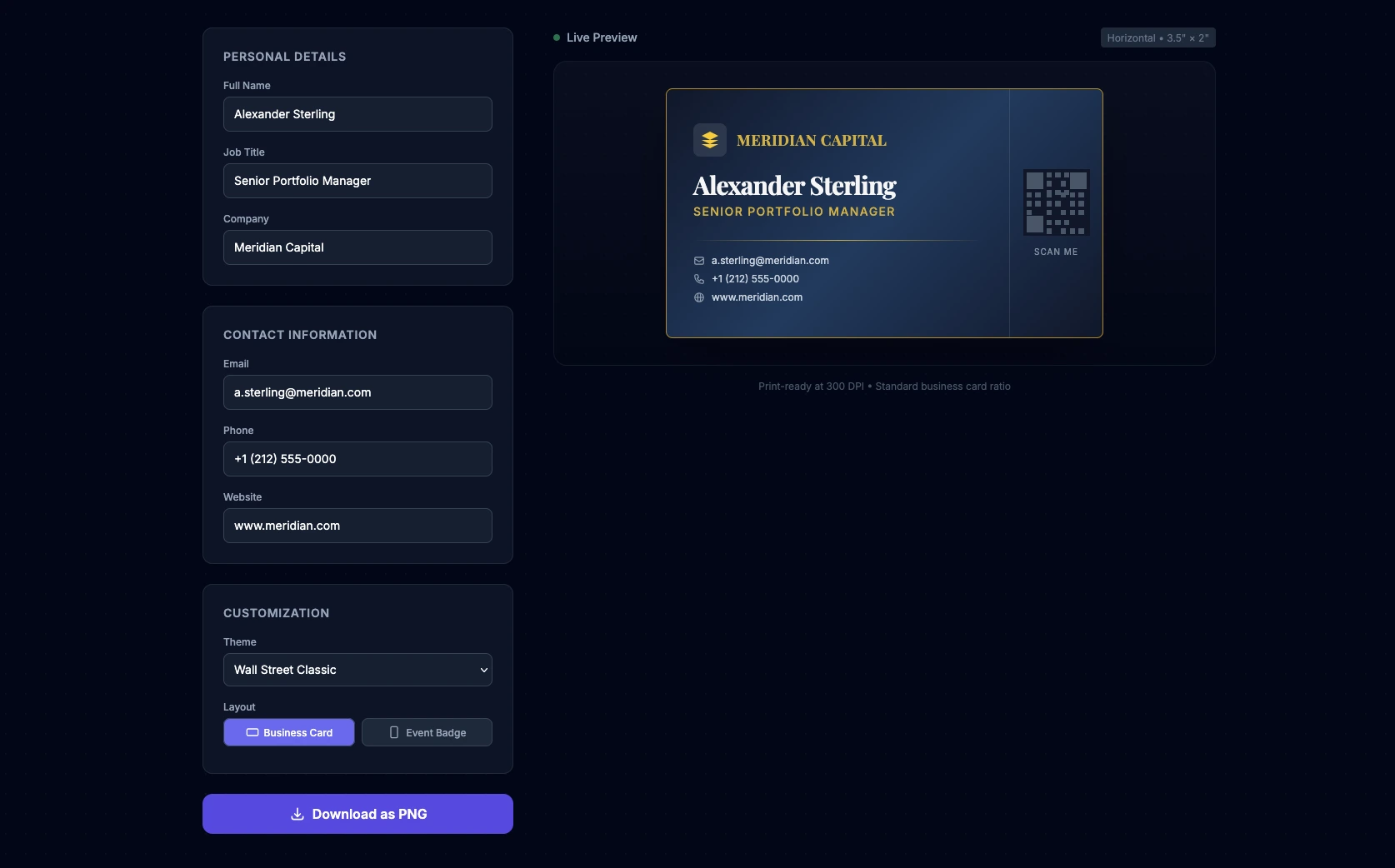
For this 13th Tuesday prompt, we challenged AI to create a complete mini-tool to generate your own professional business cards. The goal is to generate a "Single-Page" web application (HTML, CSS, and JS in a single file) that allows real-time customization of a business card or badge. We asked the AI to integrate professional themes (Wall Street, Fintech), an elegant 3D hover effect, and the ability to export the result as a PNG image.
The prompt
The prompt was written in English to maximize the quality of the generated code, with a special focus on UI/UX design and the use of external libraries via CDN.
Act as an Expert Frontend Developer and UI/UX Designer specializing in Fintech and Corporate enterprise platforms. Your mission is to create a single-file web application (HTML, CSS, and JS combined) that functions as a real-time, premium Business Card and Conference Badge generator.
Design & Layout Strategy:
- The UI must be highly professional, elegant, and trustworthy. Think "Investment Banking meets Modern Tech Startup".
- Use Tailwind CSS (via CDN) for rapid, clean styling.
- The layout should be split: a sleek configuration panel on the left (or top on mobile), and a sticky real-time live preview of the card on the right.
- Background: A subtle, sophisticated dark mode (slate/gray) or a clean corporate light mode.
The Live Preview Card (The core element):
- The card itself should look like a physical premium business card (standard ratio 3.5 x 2 inches, scaled up for the screen).
- Add a subtle CSS 3D tilt/glare effect when the user hovers over the card with their mouse to make it feel premium.
- It must include placeholders for: Company Logo, Full Name, Job Title (e.g., "Senior Portfolio Manager", "CTO"), Email, Phone Number, and a QR Code placeholder.
User Inputs & Configuration (HTML/JS):
- Text Fields: Name, Job Title, Company, Phone, Email, Website.
- Theme Selector (Dropdown):
- "Wall Street Classic" (Navy blue & Gold)
- "Fintech Minimalist" (Pure black, white text, subtle neon accent)
- "Tech Conference" (Vibrant gradient background with glassmorphism).
- Layout Toggle: Choose between "Business Card" (horizontal) or "Event Badge" (vertical).
Logic & Export (JavaScript):
- JS must instantly update the card's DOM elements as the user types (real-time data binding).
- Include a "Download Card" button. Use the
html2canvaslibrary (import it via CDN) to capture the card's HTML node and trigger a PNG download so the user can actually save their creation.The final code must be clean, heavily commented, fully functional in a modern browser, and require zero local installation.
Our verdict after testing
We tested this prompt on Qwen and the result is stunning for a "One-Shot". The interface is generated instantly, the 3D effect adds a real premium touch, and the themes apply perfectly.
As a developer, you will notice that a few minor manual adjustments are needed to achieve perfection: the QR code requires a real library to be functional, and the PNG capture via html2canvas can sometimes slightly shift complex CSS elements. However, as a baseline generated in 10 seconds, it's an exceptional time-saver!
Over to you!
Copy the code, tweak the details, and create the perfect badge for your next networking event! If you enjoy these kinds of development tricks and prompt engineering to save time, don't forget to subscribe to our newsletter to receive upcoming tools and analysis directly in your inbox.
Key Takeaways
No comments yet. Be the first to react!


Log in to join the discussion.