This Prompt Tuesday #6 explores how AI can generate a modern and functional tournament bracket interface in a single prompt. The result provides a strong foundation for organizing or following a competition with a clean, visual, and engaging layout.
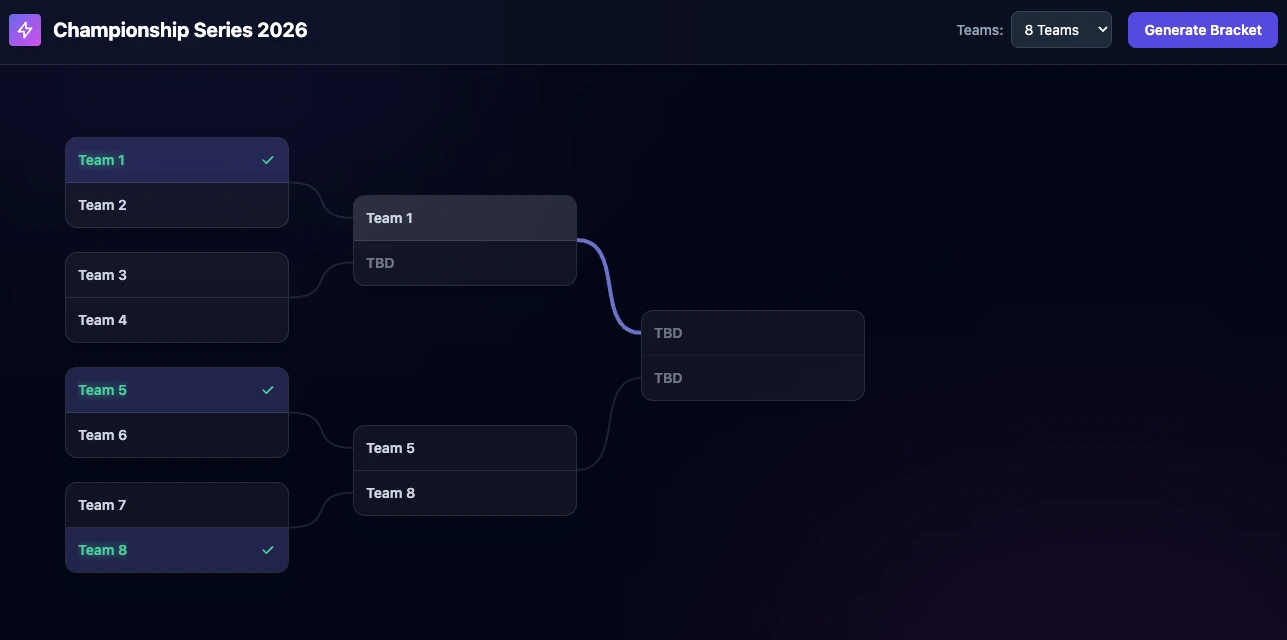
Creating a tournament bracket generator is a great example of how AI can quickly turn a product idea into a usable interface.
In this test, the objective was to generate a modern bracket system in HTML, JavaScript, and Tailwind CSS, with a strong focus on visual clarity, usability, and tournament configuration. The result produced by Gemini was functional from the first prompt and already offered a solid user experience.
The Prompt
Here is the exact prompt used to generate this interface:
Act as an expert Frontend Developer and UI/UX Designer. Your task is to generate a fully functional, highly visual, and modern tournament bracket interface using HTML, Vanilla JavaScript, and Tailwind CSS (via CDN).
Please include the following features:
- Configuration Panel: A settings area where the user can dynamically adjust the tournament parameters (e.g., tournament name, number of participating teams such as 8, 16, or 32).
- Modern Aesthetics: The bracket must be visually engaging and encourage analysis. Use modern UI trends such as glassmorphism, subtle gradients, clean typography, and a polished dark or light mode color palette. The connecting lines between matches must be clearly defined and smoothly routed.
- Interactivity: Users should be able to click on a team to advance them to the next round. Add hover effects that highlight a team's specific path through the bracket to make it easy to read.
- Responsive Layout: The bracket structure must use CSS Flexbox or CSS Grid to adapt smoothly. For larger tournaments (e.g., 32 teams), ensure the container handles overflow gracefully with horizontal scrolling or a zoom/pan feature.
Output all the code in a single, well-commented file structure (HTML containing the inline CSS and JS) so it can be previewed immediately. Focus on writing semantic, clean, and maintainable code.
What the prompt aimed to achieve
The main goal was not just to display matches, but to create an interface that makes the tournament easy and enjoyable to read. A good bracket should help users instantly understand the competition structure, follow progression from one round to the next, and identify the path to the final.
Why the result is interesting
What makes this output valuable is that it already works as a realistic starting point for a real project. In one generation, the AI produced a bracket interface that is both practical and visually appealing. That is exactly the kind of result that makes AI useful for rapid prototyping for developers.
This kind of interface can be relevant for many use cases such as sports tournaments, esports competitions, internal company challenges, or school events.
A strong base for improvement
Even if the first result is already convincing, it also opens the door to many useful follow-up prompts. Additional iterations could make the bracket more configurable and more personalized depending on the type of tournament.
For example, future prompts could add:
- Team or player name editing.
- Automatic round generation based on participant count.
- Support for custom colors and themes via the configuration panel.
- Score entry and winner progression logic.
- Export options for sharing or embedding the bracket.
Key Takeaways
No comments yet. Be the first to react!


Log in to join the discussion.